How to Play Bones and Coins
Mouse, torch, auto-battler heroes, and the HUD that actually matters.
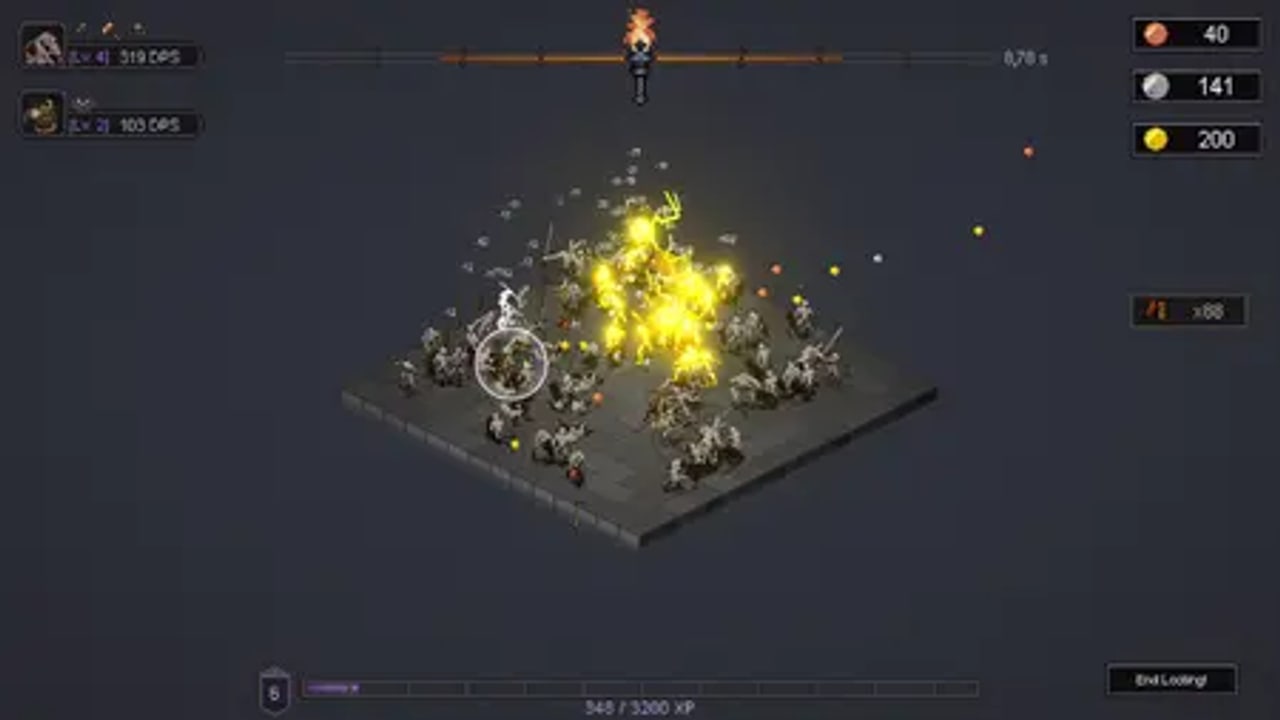
Bones and Coins is a mouse-only incremental auto-battler. Steam lists a Mouse Only Option, custom volume sliders, and save-anytime. There is no keyboard combo to learn and no controller scheme advertised. If you can keep a cursor on a clump of skeletons, you can play. This page is the control and HUD manual that the getting started checklist assumes you already skimmed.
Combat is a hover, not a click storm
Your personal attack is a damage circle around the cursor. Hover it over skeletons to chip them down. Recruited heroes fight on their own with unique animations: a Barbarian stays in the pile, a Bowman (labelled Archer in Next Fest notes) fires from range, a Shaman marks, a Wizard added in demo v0.8.0 brings a caster kit. You are the torch and the economist. They are the auto-battler.
Keep the circle on the densest overlapping hitboxes rather than chasing stragglers. Packs pay more while they are stacked. When a room thins out, herd the leftovers into the remaining clump instead of painting empty tiles. Weapon-area nodes on the skill tree enlarge that circle; they do not replace aim.
Developer comments under the official trailer are explicit: coins do not need a mouse-over. Items do, until a later skill. If you are “missing” copper, you are not. If you are missing a glowing drop, you forgot to sweep it.
The HUD, clockwise
Launch-build screenshots and demo footage share the same chrome:
- Top centre — torch timer. A flame icon and a seconds readout (examples in screenshots: 8.78s, 11.28s). When it hits zero, looting ends. Skill-tree and room bonuses can stretch this window. Treat it as the run clock, not as flavour.
- Top left — party portraits. Each hero shows a small DPS number. Use this to see whether the Bowman is actually out-damaging a neglected Barbarian, not as a live parse you must stare at.
- Top right — currencies. Three piles appear on the full HUD (gold-like coins, a second coin, and a third counter that tracks the larger bone/loot sink). Demo talk often split copper and silver. Do not spend the rare pile on the first cheap node; see loot and economy.
- Bottom centre — room XP. Example bars read 349 / 3200 or 8672 / 25600. This is per-room progression added in demo v0.8.0, not a global account level.
- Bottom left — room index. A boxed number (8, 9 in late screenshots) tracks which catacomb you are training.
- Bottom right — End Looting. You can cash out before the torch dies. Use it when the pack is empty and you would rather bank than wait.
- Top tabs — Skill Tree, Blacksmith, Guild, Inventory, Expeditions. These are the town. Expeditions are a full-release system called out in the August 2026 Steam post.
Torch, rooms, and why sessions used to feel empty
A run is one torch in one room. You can repeat the same room to feed its XP bar and unlock that room’s bonuses. Demo v0.8.0 stopped rooms from growing without a cap and added a max skeleton limit tied to room size. Earlier playtest sessions could stall with too few skeletons late; the patch made long sits more active. If a room feels dead, you are either under-levelled for that tile set or you skipped spawn-count nodes.
Dynamic room music arrived in the same patch so each catacomb sounds distinct. That is audio feedback for “you actually changed rooms,” not a combat buff.
Party AI versus your cursor
Heroes path and swing without input. Your job is to:
- Place the cursor where the next pack will die fastest.
- Sweep item drops.
- End Looting when the remaining HP is not worth the torch.
- Spend in town before the next Start Looting banner.
Do not try to micro a Barbarian’s walk. If a hero feels stuck, it is usually a movement-speed issue that v0.8.0 already buffed globally (“Faster Heroes”). Blessings and Guild upgrades in party building change what they do, not whether you click for them.
Accessibility and session length
Steam lists Save Anytime, custom volume, and mouse-only. Minimum PC specs are gentle: Windows 10 64-bit, 2 GHz CPU, 4 GB RAM, Intel HD Graphics 5000-class GPU, 1 GB disk. You can play on a laptop trackpad; a mouse is simply less tiring because the whole combat model is a hover.
An optimized campaign is about four to five hours. Individual torch windows in developer comments were described as heading toward 30–45 seconds in the late game with upgrades — short enough that “one more room” is the real time sink, not a single fight.
Common mistakes
- Swiping like a clicker. Hold the circle on the stack.
- Ignoring End Looting. Empty rooms waste torch time you could spend in the tree.
- Reading DPS portraits as a gear score. They are a hint, not a reason to fire the Shaman.
- Unlocking rooms before spawn-count is bought. New tiles with tiny packs feel worse than a fat first room.
Once the HUD is readable, go back to Getting Started for the buy order, or skip to dungeon rooms if you are already hunting bonuses. Rankings live on the tier list.
Frequently Asked Questions
Quick answers to the most common questions.
What are the Bones and Coins controls?
Mouse only. Hover to deal torch damage, click town tabs to spend, and use End Looting to cash out a room early. There is no advertised gamepad scheme.
What does the flame at the top of the screen mean?
It is the torch timer for the current looting window. When it hits zero, the run ends and coins already earned stay in the bank.
Should I wait for the torch to die every time?
No. Hit End Looting when the pack is gone. Extra empty seconds do not print coins.
Is Bones and Coins idle?
Semi-idle. Heroes auto-attack, coins auto-collect, and a later skill auto-loots items. You still aim the torch and pick upgrades. See loot and economy.